Free Chrome Extension
Earn cashback on Amazon. One click.
BUCKS automatically activates cashback on eligible Amazon product pages. We earn an affiliate commission and pay a share back to you — no coupons, no codes, and your price never changes.
No credit card · No monthly fees · Chrome only
20+ Amazon categories
No credit card required
No monthly fees
PayPal payouts from $10
Amazon.com purchases only
How it works
Three steps. One click.
Once installed, BUCKS spots the eligible product page and prices the offer for you. Cashback activates automatically on eligible products, and BUCKS tracks them from there.
1
Install the extension
Add BUCKS to Chrome in under 30 seconds. No account required to install. Sign in later to track your earnings.
2
Shop on Amazon normally
When you visit an eligible Amazon product page, BUCKS shows the cashback available and activates it automatically — you pay the same price as always.
3
Get paid to PayPal
After Amazon confirms the commission, your balance updates. Once it reaches $10.00, request a payout to your PayPal account.
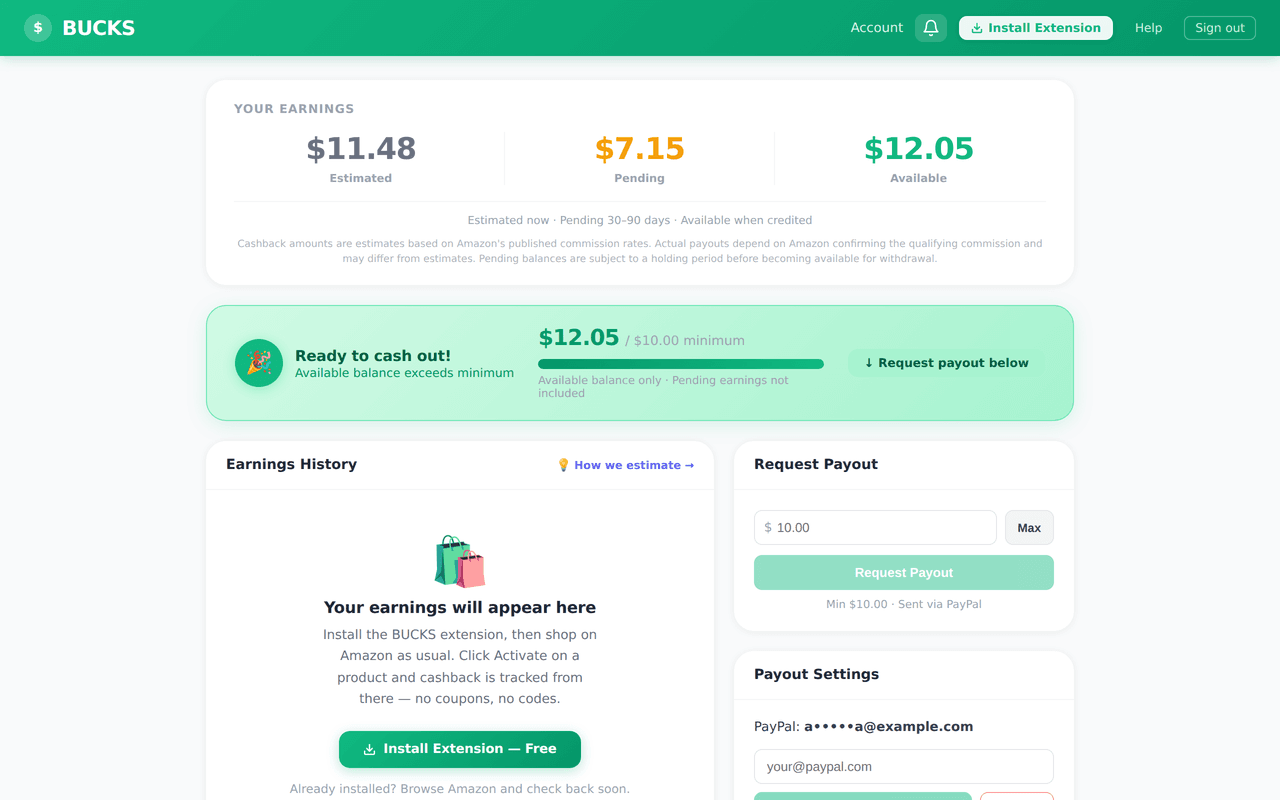
Your dashboard
Track every dollar, start to finish.
Reward Rail status
Each purchase moves through Estimated → Pending → Available → Paid as Amazon confirms the commission.
PayPal payouts on demand
Once your balance reaches $10.00, request a payout instantly. Funds arrive within 1–3 business days via PayPal.
Cashback notifications
Opt-in alerts when a commission is confirmed or your payout is on its way. All notification preferences are yours to control.
Trust & Safety
Built with your privacy first.
BUCKS was designed to be the cashback tool we would want to use ourselves. No browsing history tracking, no selling data, no surprises.
Privacy-first by design
BUCKS only activates on Amazon.com. It reads no browsing history, captures no keystrokes, and stores no purchase details beyond what Amazon reports through its affiliate program.
Remote kill switch
If we ever detect an issue, a server-side kill switch instantly disables the extension for all users — no Chrome update required. Status is always shown transparently in the popup.
Amazon.com only
The extension is granted permission for
https://*.amazon.com only. It is entirely inactive on every other website.Common questions
Honest answers.
Is BUCKS actually free?
Yes. We earn affiliate commissions from Amazon when you shop through BUCKS and share a portion back with you. You pay nothing — no subscriptions, no hidden fees, ever.
Does it change my Amazon prices?
No. Affiliate links never affect the price you pay. You see the same price as any other shopper. Cashback comes from Amazon's commission program, not from you.
Which categories earn cashback?
Amazon's affiliate program covers 20+ categories including Electronics, Books, Kitchen, Clothing, and more. Rates vary by category. See our rate estimates page for current figures.
Why is cashback described as "estimated"?
Amazon confirms commissions after the return window closes (typically 60–90 days). Before that, we show an estimate based on the product category rate. The confirmed amount may differ slightly.
What if Chrome displays an ‘Enhanced Safe Browsing’ note?
Chrome may show a ‘new extension’ note during install for users with Enhanced Safe Browsing enabled — simply click Continue. BUCKS is verified and compliant.
Ready to start?
Install BUCKS and start earning estimated cashback.
Free, takes 30 seconds. Cashback activates automatically on eligible product pages.